Now a days email spoofing has been a very common act, there are tons of softwares which can be used for email spoofing. Alot of scammers use mail bombing along with email spoofing, As you know that this blog is for beginners so i will first explain
what is mail bombing? and
what is email spoofing? and then will explain you
How to trace a sender in Gmail!
What is Email Spoofing?
Email spoofing is an act to sent an email from an email which does not belong to you, this is mostly used for scamming people, Hackers use it as a medium for social engineering
For Example If a user gets a phishing scam asking to update his login information, the senders email is something like
xyz@hotmail.com, this would make the victim suspicious and he/she will not pay attention to this email but on the other hand if the email is from
security@microsoft.com or
security@facebook.com the victim would probably feel that the email is from real sender and he/she would give his login details
What is Mail bombing?
A Mail bombing is sending a mass number of emails to a specific person or system.A huge amount of mail may simply fill up the recipient's disk space on the server or, in some cases, may be too much for a server to handle and may cause the server to stop functioning
Combining Mail bombing with Email
A few days back when I opened my
Gmail ID, I noticed that i had received 5000+ emails those all emails looked that they were from different senders as each email's body was same but the email addresses keep changing.
For example: The first email will be
1234@attacker.com the others numbers before @ would change in every email.
I was receiving 100+ emails per second, A normal user would create a spam filter for one of the email
1234@attacker.com but this wont stop the attack as the email
1234@attacker.com is the spoofed email not the real email, so here is how I
traced the sender's information in Gmail
Tracing a Senders information in Gmail
You must be curious to know that how I traced senders information in gmail, some of you might ask how to trace sender's information in Hotmail or Yahoo, so I will explain it in upcoming articles in my blog as these are not the part of the article
Here is the step by step method to trace a sender's information in Gmail
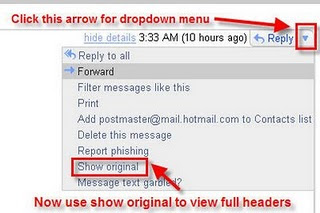
1.Open the Email in Gmail you want to trace
2.Click on More
Options and Click on “
Show originals”
Refer to Image for More details:
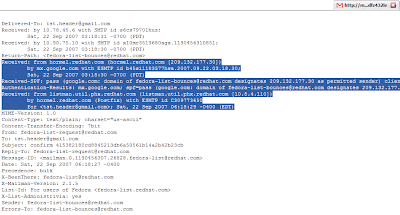
3. Now a new Window will pop up like this and there see the highlighted area
4. Check the first line “
hormel.redhat.net” ip=209.132.177.30″
That’s The Ip of The sender. now to trace the sender using this ip.
5. Open this site
www.network-tools.com
Enter the IP address and click on
submit
Hope you have liked the article to
trace a sender's information in Gmail.