Showing posts with label facebook tricks. Show all posts

Sunday, 19 May 2013

Remove Your Application Permissions From Facebook, Twitter And Others

| |
0 comments

Irritated of getting Game requests & other application requests from facebook??Usually these requests  as notifications in plenty of numbers makes us go crazy..
Even in twitter, myspace, linkedin, these stuff make us irritated. So to stop this , there is a facility which disables the requests as per our wish!!

1. Visit MyPermissions
2. You will see a screen like below. Just click on any icon to open that site’s permissions page. The pages for apps permission are very difficult to find but MyPermissions makes it very easy for you to manage your apps permissions for many popular social networking sites. The main are Facebook, Google, Yahoo, Dropbox, Twitter and many more. You also get an option to get a monthly reminder to clean your apps permissions.
                   
3. When you click on any icon you will see all the apps that you gave permissions to, there may be apps which you have not used for years but they can access your data anytime they want to. So delete those apps that you don’t use now. In below example we have a permissions page for Facebook apps.


That’s it. Check apps permission for every site you use at MyPermissions

Read More

Thursday, 16 May 2013

Remove Notification From Facebook Chat

| |
0 comments

Everyone who uses Facebook know’s that they have feature, that tells you when other side have seen your message. And it  works both ways: 


Other side sees when you have read their messages. Here's a  good news for you, if you don’t want that other side know’s when you have or have not seen their messages. You can remove this “seen” notification with browser extensions. There Are couple of things that you have to know before installing.
     
When UNSEEN Extension is installed, then your Facebook works like this:
1. You send chat message to recipient -> You can’t see when message is read
2. Recipient sends chat message to you -> Recipient can’t see when you have read it
3. You have new message on Facebook inbox and you open it -> Message will stay as unread state!!

INSTALLING UNSEEN TO CHROME


1. Go to FB unseen installation page by clicking HERE.
2. Click Add to Chrome


3. Confirm installation by clicking Add.
4. Extension is now installed!
                           
If you ever have to, you can disable unseen extension by clicking unseen icon from Chrome.(to disable)
        
Installing Unseen add-on to Firefox
1. Go to Unseen installation page by clicking HERE. From there click Add to Firefox.

2. Click Install Now.
       3.ADD-ON IS NOW INSTALLED!!

                          
FIREFOX – UNSEEN INSTALLED
If you ever have to, you can disable this add-on. For some reason Firefox doesn’t have this neat disable/enable button near address bar, so you have to do this hard way.


1. Click Firefox from top left corner and from there click Add-ons.
                           

2. Select Extensions from left panel.


3.To disable, Click Disable
On using this extensions,the drawbacks are : your inbox messages stays as unread state. It’s the annoyance that comes with these. Facebook shows that you have 10 new messages in inbox, but when you open it, it’s just same old messages..
Read More

Sunday, 31 March 2013

Make Your Facebook Beautiful With BEAUTIFY Fb

| |
0 comments

Beautify Facebook is a Chrome extension & this is only for chrome users,that lets you tweak and change the way Facebook appears in your browser. It is a must have extension. Must try if you are a Facebook user.
                              

Features :

1. The add-on lets you add a custom background image to Facebook to hide the traditional white background.
2. Rounds off the corners of chat boxes and sidebars.
3.  Adds emoticons to Facebook chat, and provides transparency settings so you can tweak the look of your news feed or the sidebars to fade into the background.
4. Makes Sidebars on both the sides fixed , so that you can scroll down without leaving the sidebars. This is the most amazing feature of Beautify Facebook.
                                           And much more , give it a try.


Read More

Wednesday, 6 February 2013

Find who Unfriended you on Facebook

| |
0 comments
This topic has created probably one of biggest scams on facebook, still is. To get facts right there is no way you can find out who deleted you from their friends list in past. But you can know if someone removes/blocks you in future for now on. 
How? To be frank there are lot of browser extensions and apps that can help you. What they do is they make list of your friends list and everyday they compare new list with old one, simple logic isn’t it. One such service is who.deleted.me.

And also there is an article on this blog  FACEBOOK UNFRIEND FINDER, which is similar to this
1> Go to who.deleted.me. Click ‘login with facebook’ and then click ‘allow’. If someone unfriend/blocks you on facebook in future, you’ll get a email about the details to the mail id you use for your account
.

Read More

Thursday, 24 January 2013

Fb Downloader : A tool to download your facebook albums

| |
0 comments


FBDownloader is a small, simple, easy to use application specially designed to help you download your tagged photos, friend photos and albums from facebook directly to your PC.
                                        
Basically all that you have to do is login to your Facebook account and select the images to download and you're good to go. So, if you want a tool to help you download your photos with just a click, then take FBDownloader for a spin and see if its capabilities are enough to satisfy your needs.

Bottom line is this is really good software, and it's free and easy to use. There is no reason to not download this onto your computer right now, even if you don't need it immediately. It makes downloading all your favorite photos on Facebook so easy, and gets the job done in half the time. You can download isolated photos, or entire albums, or just random tagged photos. A great feature is that as you download the photos, you can re-size them before saving. This is just great, simple free software.


                               Download fbDownloader


Read More

Saturday, 19 May 2012

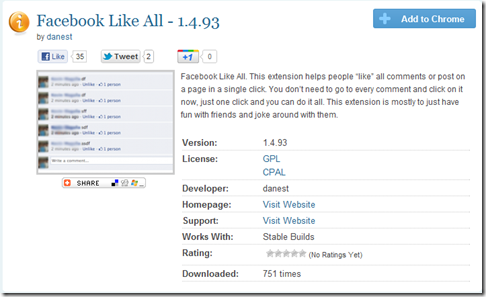
Like Everything On Any Facebook Wall With Single Click

| |
0 comments
You can LIKE all of the other posts in your facebook profile....

To do this,
You need  1. Chrome Browser
                 2.Chrome Extension

When you open that chrome extension, you will see a screen which is below
Capture
and then, just click the LIKE button in that window
[Captur%255B3%255D.png]


Read More

Social Profiles

Animated Social Gadget - Blogger And Wordpress Tips