Showing posts with label twitter. Show all posts

Tuesday, 9 April 2013

Twiends Hack To Get Free Twitter Followers Automatically

| |
0 comments

 Get Free Twitter Followers Automatically Using Twiends Hack :


Using this trick , you can easily get free twitter followers..
Just try this steps below

The Twiends Script:


javascript: /* nemsis 4 bhw */ function tr_f() { var followlinks = []; for (var i=0; i document.links.length; i++) {if (document.links[i].getAttribute(“class”)==”follow”){followlinks[followlinks.length] = document.links[i];}} /* nemsis 4 bhw */ for (var i=0; ifollowlinks.length; i++) {var rrr=followlinks[i].onclick();} } tr_f();


1. Copy the above script and save as a bookmarklet. A sample on how to make a bookmarklet in Google Chrome is shown.

a) Right click on the bookmarks bar and select “ Add page ” .


b) Copy the given script into the box in front of “ URL: ” and give it any name , say , Twiends Script.

So , till here you have made a bookmarklet with the Twiends Script .
2. Now go to Twiends and login with your twitter id and password.

3.
When you see a screen which shows other tweeps you can follow then click the bookmarklet and you will see that you automatically start following other people.
                        
When all the people on that page will be followed then you can press the reload button and again click the bookmarklet. So with the Twiends script you can easily follow any number of people with ease and as a result you can get free Twitter followers in bulk.

Read More

Friday, 4 January 2013

How to Find Best Times to Tweet with Tweriod

| |
0 comments


How are you getting on with Twitter? Twitter is micro-blogging website and you may have seen how the Twitter stream works there. People send out tweets in each second and as more and more tweets get posted, early ones will get buried soon. So unlike Facebook or Google+, Twitter is kind of hard to keep track of everything. If you wanna track all, you have to be on it, search tweets or check out interesting profiles individually. But people mostly tend to view tweets via their home stream at the moment they are on Twitter. Do you know when your followers will be online? Do your tweets get more attention of your followers?


Ask Your Followers

Yes, You heard me? Ask your followers when they will be online. Doesn't it cool? You can ask each of your followers when they would check their tweets or comes online. So you can come up with a schedule and start scheduling your tweets. Your followers will be happy to see your tweets when they online and you can increase engagement of your tweets too. How simple. isn't it? I know, now you thinking, how stupid I am? ;) When it comes to Twitter, we may not talking about 3 or 4 followers. It may 100s or 1000s of followers. So practically, we can't reach everyone. But that's why analytic tools exist for. If you remember, earlier we have discussed such a tool to analyze and schedule your tweets - Timely. You can make use of such a tool to analyze and display best times that your tweets has been retweeted or clicked. Here I'm gonna introduce another tool that you can make use of. Don't stick to one until you find best tool for you.


Analyze and Find Best Times

Tweriod is a tool that capable of showing best times for you to tweet. It analyze your last 600 tweets and last 5000 of your followers including their tweets together to find out what time slots had better engagement with your tweets. After analysis, it will show you general statistics of your tweets including hourly graphs and also it will show the best times you get replies on Twitter. The times you get more replies or mentions could be the times more your friends and followers interacting with you and being online on Twitter. However Tweriod suggests you time slots to tweet on Weekends, Weekdays, Sundays and Mondays with relevant graphical presentation how your tweets been exposed. And my favorite feature of all is that it can sync all best times it suggests with our Buffer account to schedule future tweets.

Tweriod is a free tool. But it doesn't mean it doesn't have limitations. If you impressed with free Tweriod statistics, you can go for premium plan with more features. Premium plan analyzes more followers and it includes detailed analytics for all days of the week, PDF/CSV/Excel reports and auto-sync capability with your Buffer account.

Steps:

1. Go to Tweriod website.

2. Click on Sign Up with Twitter button.

3. Now you will need to authorize Tweriod to access your Twitter account. Click Allow button.

4. You will get a pop up box to update your Tweriod profile. Enter relevant details, select preferred options and click Get Started button.


5. Now you will have to wait until Tweriod analyze your Twitter account and you will get adirect message on Twitter or an email when your analysis is ready.

Note: If you didn't got any notification, you better proceed to next step after few minutes. If analysis is ready, you will able to view it.


6. Once your analysis is ready, navigate to Tweriod Dashboard and sign in with your Twitter account.

7. Now you can get access to your analysis by clicking on My Analysis button.


Note: Also there you can see when you will able to analyze your Twitter account again. Until that, you can access your current Twitter analysis.


8. You can view general statistics, hourly graphs, @replies and when you had most exposure for your tweets.


More Information:

* If you are already using Buffer to schedule your tweets, you can add optimal times that Tweriod suggests you to tweet, directly to your Buffer account by clicking on Connect with Buffer account.


Note: You will have to authorize Tweriod to access your Buffer account.
Read More

Sunday, 23 December 2012

★★Fake Follower Check in Twitter★★

| |
0 comments

Are you on Twitter and rocking with other tweeps you follow or followed by? Twitter is a place where anyone can follow you unless you protected your tweets. It doesn't matter if the followers count on your Twitter account goes higher and higher everyday, isn't it? It means you are being more popular and others would love to see what are you tweeting all day along. Probably, you may right about the attitude of being followed by many number of people. But it's another aspect of the story. Do you know what's the other side of the same story?
                                 

 "Spammy"?


Yeah, it is. It's about spammers. You may have heard of fake or spammy followers who would love to follow others and promote their links. They are pretty annoying. They are being paid for the annoyance they create. So they don't mind being annoying at all. Anyway you can report or block them on Twitter easily. Or it could be followers you buy to expand your dominance on Twitter and reach more users with your business. They may feels like real followers. They don't spam, but have no activity. They don't help you spreading the word. Is it why you buy followers for?


Do You Have Fake Followers?


It's good to know if you have been followed by spammers. Sometimes spammers may inactive. They are not only spam by sending you links on Twitter. As they follow you, they can work out their dirty tricks to hack into your Twitter account and publish your credentials online. When your information goes online, you will get to know that you have been hacked. Else, it's just silence. Security matters. Other fact of spammers are that they are not helping you to grow. Though you have 1000s of followers, they may not listening to you at least once tough you tweet frequently. So if you calculate your productivity on Twitter with current follower count, you won't get expected results. Therefore as I said, it's always good to know that you have been followed by fakies and how any of them. It may not pose a great threat for you, but you can know of number of followers you can count on.

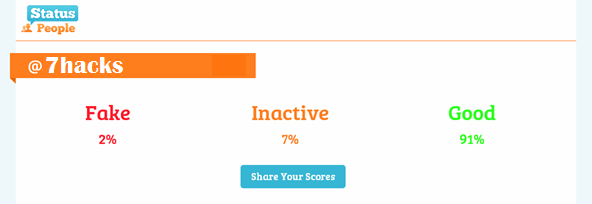
Fake Followers Check by StatusPeople is a simple tool online which helps you identify your followers. It categorize your followers into fake, inactive and good. Do you wonder how it works? Fake Followers Check will take sample of your followers if you have more than 1000 followers and analyze them against rules they have created to identify spam accounts. If you have more than 1000 followers, the percentage of fake followers it shows may depend on the sample follower data it takes from your Twitter account. So you can expect slight difference time to time. Basically, it checks for followers who follow enormous number of people but haven't being followed by anyone or followed by only few people. Isn't it a valid reason in most cases? So if you would love to find out how it goes for you and your favorite Twitter accounts, here we go.

Steps to find out:

1. Navigate to Fake Followers Check website.

2. Click on Connect to Twitter text on the page.

3. Now you will prompt to authorize StatusPeople Fake Followers to use your Twitter account to find fake followers. Click Authorize app button.
                     
4. Fake followers checker will now start analyzing your Twitter account. It may take a while depends on your follower count. Once it's done with analysis, it will come up with percentages of Fake, Inactive and Active Twitter followers you have.


Hope You enjoyed this article...Share your valuable comments below....!!!!
Read More

Sunday, 4 November 2012

Analyze & Manage Your Twitter Followers with Tweepi

| |
0 comments
Are you on Twitter? Technically, Twitter is a micro-blogging platform to communicate and engage with others people on the platform. Generally, we use Twitter to tweet 'cause tweets can't tweet on elsewhere though some social networks starting to follow Twitter techniques on their platforms too ;) I'm just kidding. Anyway, if you are on Twitter, you are familiar with the terms tweets, followers, following, direct messages and so on. I have no doubt that you are accepting the challenge of shortening your messages into 140 characters and enjoy sharing 'em with other tweeps on Twitter. But are you familiar with managing your Twitter account?


With Tweepi,

                     U can analyze


● Number of tweets


● Number of retweets


● Number of replies


● Number of links in tweets


● Number of followers


● Number of followers


● Number of friends (Following)


● Number of statuses


● Last tweet time


● Link Ratio


● Follow Ratio


● Klout Score


● Location

   Steps

1. Navigate to Tweepi Sign Up page.

2. Click Proceed to Twitter button there.

3. Now you will prompt to sign in to Twitter and authorize Tweepi application to use your Twitter account to grab information of your followers to analyze, unless you already signed in to Twitter. Else you will proceed to next step of Tweepi sign up process.

4. Provide your personal details and a password for your Tweepi account. Click Start using Tweepi button after selecting necessary options through below check boxes.

5. Now you will be directed to your Tweepi dashboard. Here you can manage your Twitter account with sort of interesting tools. Let's see what kind of tools available for FREE users.

Note: If you have immense number of followers, you may have to wait for few seconds until Tweepi populate stats for your accountto begin with using tools.


Flush - This tool will list Twitter users who aren't following you back though you follow them. You can select users and unfollow easily here if you don't find useful in following them on Twitter. Just don't unfollow them for not being following you back if you find their tweets interesting to you. It's obvious. Isn't it?

Reciprocate - This is my favorite. You can find Twitter users who are following you, but yet you aren't following back. You could have missed them to check out and follow earlier. If you missed, you can find them all here and follow as you find how interesting they are and to build more worthy connections.

Cleanup - This tool basically list all Twitter users you are following. You can unfollow users if you found their updates are not interesting to you anymore, buggy or they are mostly idle and not engaging with your conversations on Twitter. But just don't unfollow a user being idle if it's not too long as they could be having different circumstances and he/she may start to tweet out once they back online.

Follow followers - This tool helps you find followers of a specific Twitter account with similar interests. You just need to enter a Twitter handle you familiar with such as @7hacks and proceed. Then you will able to see all the followers of that Twitter account you entered and can start following users with similar interests. It's very useful way to find users with similar interests.

Follow friends - This is similar to "Follow followers" tool we discussed above. Here you can get to know friends of a specific Twitter user. I mean, if you know of a interesting Twitter user, you can find who he/she is following. It's a great way to find friends on Twitter via a known Twitter friend, if you starting out with Twitter as a newbie. In addition, you can find very useful tweeps and resources to follow too.

Follow list - Creating lists on Twitter is very useful to find updates of specific subjects or topics. This tool helps you go through lists of Twitter users and follow interesting Twitter users in such lists. Here you need to enter Twitter handle of a specific account and it will populate all the lists that Twitter account has. Then, as usually, you can explore the list and follow users you find useful.

Paste & analyze - This tool is wonderful. You can analyze multiple Twitter accounts you wish to follow or already following, and see their information. Just enter Twitter handles separated by commas (i.e: @WootWoot, @Sparrow, @WhizKid, @ItsMyBirthday, @ImReadingThis) and proceed to see information of the Twitter users you have entered.


More information:
As you use above Tweepi tools, I'd like to mention few options you should keep in mind which you may not aware in first use and in decision making.

Load Stats


This option will load the stats not populated on your graph.


Columns


This option helps you to add more columns to discover more information about tweeps.


Tweepi Presets


Tweepi presets helps you arranging tweeps considering their statistics on different factors. It's more convenient for users to identify who are the ones best to follow and unfollow. Make sure to change presets and make use of them. 

Hope this article is useful to u!!!!
Share your valuable comments below :)


Read More

Friday, 7 September 2012

Twitter Background Customizations

| |
0 comments

1. Custom Twitter Backgrounds

Good background themes really can add charms in your profile. In twitter, you can choose nineteen basic background themes as you have no option to choose rather than them but, it is possible to use and customize backgrounds according to your choice. In order to do it, you have to go to www.tweetstyle.com and there, select your desired theme and download it. Now, the next stepis to upload it in your twitter account. In this way, you can set your own custom twitter background. You can also go-to Colourlovers.com and can  create your own custom theme as all you need to sign inyour twitter account in order to set it for twitter. So, in-order to select background theme for your twitter’s profile, you have to go to-settings- Design Menu.


2. How to do twit of more than 140 characters


Twitter doesn’t allow posting texts more than 140 characters but, it is possible to post texts more that 140 characters by using web-site named- TwitLonger.com. Yes, Twit Longer is an easy way to post long messages to twitter as write what you need at Tweet Longer and Tweet Longer will post the link to twitter for you.
3. How to know who has unfollowed you?


In order to know about who has un-followed you in your twitter’s account as for it; you have to go to www.twunfollow.com and there, sign in by your twitter account. Now, the next step is to enter your email-id and then,this service will tell you informationabout who has un-followed you.


4. Automated Twitter Followers
Yes, now you can get automated twitter’s followers with the help of Free-Followers.com. Free-Followers.com is a unique service that allows you to automatically grow and maintain your Twitter’s Follower base. In Free-Followers.com, you can do-
1. Automatically searches recent tweetsand user profiles for people with similar interests.
2. Automatically Follows People with the same interests.
3. Automatically Un-Follows those Twitter users that don’t follow you back, this helps maintains a balance between followers and following.
So, free-followers.com is a great way in-order to increase your twitter followers and manage your twitter account.

Finally, these above twitter features are really interesting to do. I hope you like this article…

Read More

Wednesday, 1 August 2012

Tweet Whistle :Increase Your Followers!!!!

| |
0 comments

What is Tweet Whistle?


Tweet Whistle is a powerful and a unique Twitter Marketing solution that helps its users to get more twitter followers. Tweet Whistle has many powerful features.  Tweet Whistle has Proxy Support, it can search for users by tweet or bio keywords, search for users who have referenced of other people, search for users by location, search for users who display a certain attitude, and it can also search for followers of other users. With Tweet Whistle, you would find out who has mentioned your profile, you can check the current or weekly trends, you can manage all your DM’s from one location. Tweet Whistle also has an automation feature where you can automatically follow users back, send unfollows, send messages and tweets, automatically send RSS Feed tweets and it can also automatically update its software.


How to use Tweet Whistle?
                                      Tweet whistle is very easy to use. 
 After downloading, click the executable, after clicking the executable you would be prompted to the Tweet Whistle Installer. You can choose where you would like to install Tweet Whistle; if you think the default install location is okay, click the next button to proceed. After clicking the next button, tweet whistle is now beginning to install. Now, if you think you are not yet sure of installing tweet whistle in your computer, you can cancel the installation process.  If you wish, you can delete the executable of the Tweet Whistle that you downloaded. After all, it is not needed in order to run the Tweet Whistle.

Remember, you only need to install Tweet Whistle once.


Launching the Tweet Whistle

Searching for Tweet Keywords. This is a feature of Tweet Whistle where you simply type keywords and search it by clicking the search button bellow it. You can also search for people, attitudes, follows, and search trends using the Tab headings inside the main  ‘search’ tab.
Searching people:  This feature allows you to find all tweets from a person, tweets to this person and any tweets referencing this person just by typing a keyword.

Searching places: This feature will allow you to find profiles based on a geographical location. You can specify the place in the search box: by city, state or zip code. You can also specify the distance from this location from 1-1000 miles or kilometers.

Searching Attitudes: This feature would instantly search for attitudes in users profiles with the option of specifying a positive or negative attitude or if they’re asking a question. You will also have the option to specify the pages ranging from 1-5.

Searching by Follows: This feature is a useful utility to find out what users are following a certain profile. This is easily done by typing in the name in to the search fields.  You can also find users that you are following; as well as all users that are following you.

Search Trends: This feature is a great way to find out what other users are searching on Twitter. This will provide you with the information on the name, time and query over a current, daily or weekly time scale.

Send Feature. This feature of Tweet Whistle allows you to send follows, un-follows, messages, tweets, RSS Tweets.

Follows: this will allow you to send follows to a user who‘s Profiles you have collected from the  search notebook.

Un-follows: this will allow you to stop following users who you’re following but not followed you back. You can choose options on what order they should be un-followed:

Un-follow oldest followers first..
Un-follow newest followers first..
Un-follow in any order..
Messages: This will allow you to send messages to your followers with customizable options. You can automatically configure Tweet Whistle to send out a list of messages for you. Here are some of the customizable options of the message feature:

Maximum number of messages to send.
Automatically get latest followers.
Send to the loaded list of profiles.
Time delay messages; default is between 1-5 seconds.
Don’t send a message to the same person twice.
Message order; send messages in a specific order.
This feature also allows you to send URL’s. All you need to do is provide your username and API key.
RSS Tweets: This will allow you to turn an RSS Feed into a tweet. The RSS tweeting allows you to fetch a pre-defined RSS feed and make a tweet based on the contents of that feed. To tweet an RSS feed, put the URL into the top input box and click the preview to see what the tweet will look like. You have the same customizable options as when sending out a regular tweet; such as the maximum amount of tweets to post and the time delay between each one.
Tweets: This will allow you to send tweets to your profile, with ability to add and select a predefined tweet.  You can choose to send out tweets in a current order or random order; with a set number of tweets and specified time delay between each tweet.
Mentions. This feature allows you to view and send out mentions on your twitter account. You can tick the automatically mentions when logging in- which will save you from refreshing them form reviewing the tab. Tweet Whistle allows you to send out mentions with the limit of 140 characters.

Messages. This feature is a list of the 20 most recent direct messages sent to your currently selected twitter account. You can retweet the direct message, respond directly to the sender or                                     delete the message.
Activity. This area allows you to see a breakdown of the activity in Tweet Whistle represented by a pie chart. You can choose to see your daily activity or the time since you started using Tweet Whistle. If you’ve sent a message or a tweet utilizing the URL shortening service, that activity will also be displayed for the list of URL’s you’ve used.
With the Activity feature, you can easily see the activity of your twitter account. This will give you a summary of your all account activity covering.
Automation. This feature of Tweet Whistle allows you to place your twitter account on auto-pilot.

To put your account on auto-pilot you must follow the following steps in order:

  • Choose an account from the Account Management window.
  • Check one or more options perform and enter any additional options for each item like the minimum and maximum sleeping time for instance.
  • Once you have all your options selected, click the Add button to add it to the list. You can now add another automation task for the same account
  • Check the Cycle through list every X hours option if you wish to perform the list tasks more than once.
  • Click the Start button to begin and Tweet Whistle will automatically perform the list of tasks you have defined.
  • You can also save your task list by clicking the Save as icon at the top and specify a filename and a location to save your work.

Statistics. Statistics are retrieved from www.twittercounter.com using their latest API. By default, the current account is used but you can enter any valid Twitter screen name to view the following                 

The date tracking was started
The initial followers count
Average number of new followers per day since tracking started
The current ranking position in Twitter
Using this statistics page, you can view a detailed graph displaying the tracking information, followers, twitter rank and average growth per day. You can filter this information by time; click the Dropdown box next to the Retrieve button.

Read More

Saturday, 7 July 2012

►Twitter ░Tips 'n' Tricks◄

| |
0 comments

Nowadays twitter is most popular among all the social networking Sites.There are 100 million users of twitter and the whole world loves it due to its simplicity.Most of us use twitter only for posting text or sharing photos and links.But there are so many interesting
features of twitter with which we are not aware.....


How to do twit of more than 140 characters
  • Go to www.teitlonger.com and than sign in by your twitter account.
  • Now type your twit in the text box and than post it.
  • Your half twit will appear on twitter but there will be a link related to it.
  • By clicking on the link one can read your full twit.
How to know who has unfollowed you
  • Go to www.twunfollow.com  and than sign in by twitter account.
  • Now enter your e-mail id and than this service will tell you information about who has unfollowed you.
Custom twitter backgrounds
Twitter has only 12 basic background,so you have no option rather than choosing them.But it is possible to use and customize backgrounds according to your choice.For doing this ,
just visit
                      www.tweetstyle.com.   
Read More

Tuesday, 3 July 2012

Chat via TWITTER!!!!!!!!!!!!!!

| |
0 comments

Social Networking Sites are going to famous each every day.They are work to gather people on same place that's very good things.In this social networking site twitter and facebook both are at very higher level.Most of people know about facebook and twitter.Among both Facebook has it's own Chat application but twitter Not yet take step to make chat application. But this chat apps is not official of Twitter.You have to just install one Extension Having name Bonfire which will be available from Bonfire.com very free.Just install in your Browser and you will able to chat with your twitter friends.


HERE ARE SOME OF THE SCREENSHOTS


You have to download extension for your browser and integrate it.
Open twitter.com
log in in to your account
You can able to chat with your twitter friend.
Download your browser extension BONFIRE


Read More

Social Profiles

Animated Social Gadget - Blogger And Wordpress Tips