Showing posts with label Misc. Show all posts

Sunday, 12 May 2013

▫▫Share Your Computer Screen with your Friends▫▫

| |
0 comments

Have you ever wanted to share your computer screen with your friends? You can find many different kind of software tools to share your screen with your friends or someone else. Yeah, it's that simple. But when it comes to sharing screen, mostly, both parties need to have same software tool installed on their computers. So, it may need some time to prepare, complete initial requirements and setting up. But what if you can share your computer screen with friends instantly without installing any software tools?


Why Screen Sharing?


Screen sharing seems kind of fun activity. Isn't it? Who needs to see what happens on other computer screen? You may wonder how it can be helpful. But there are some scenarios that it can be really matters. It can be helpful to troubleshoot computer problems and especially if you are engaged in a group activity where all parties need to contribute with ideas or view what's going on source computer screen. It reminds me of school projects. I know, there's more scenarios you can think of. Anyway let's get to know how it can be done, instantly.


How Screenleap Works?


  • Screenleap doesn't need you to install any of their software components in your computer. 
  • But the tool is depend upon Java, therefore you need to have Java installed. Once Java installed in your computer, it's just few clicks to share your screen with the people you need it to be shared. 
  • Right after you start sharing your computer screen, you will be given a specific URL or link which you can send to your friends who wanna view your screen live and only they can view your screen until you end the session.


  • Currently Screenleap can share screen of a computer only. 
  • But viewers can view screen that has been shared with Screenleap via computer, tablet or smartphone. 
  • So the same screen can be shared with multiple devices at once. The requirements for viewers are a stable internet connection and device with a HTML5 support web browser.
  •  Instead of the link you send to view your screen, Screenleap provides you a share code too. 

Before You Go:

You need to have Java installed as a prerequisite for Screenleap. If you don't have Java on your computer, download and install Java.


Steps:

1. Go to Screenleap website.

2. Click on Share your screen now! button.

Notes:

* You may prompt to allow Screenleap if your browser needs permission to run Java applets. Click Allow there.

* First time you will get a Java prompt to run Screnleap too. Make sure to click Run button.


3. You will start to see Screenleap control panel on the top of your screen. It means you are now sharing your screen. You can pause or stop screen sharing and also view how many users viewing your screen right now. Also you can share portion of screen instead of entire screen too.
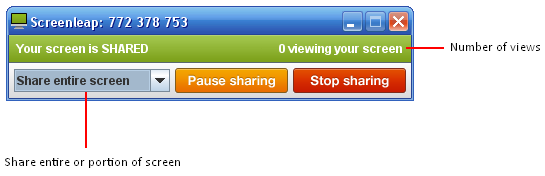

4. Now you just need to send the provided link for your friends who need to view your screen. They can view your screen just by entering that URL in their web browser in computer, tablet or smartphone. Instead of the link, you can send them the share code you have been given, so they can view your screen by entering share code at Screenleap.com too.


Hope you Enjoyed this article

Read More

Thursday, 11 April 2013

Download Facebook Albums With PICK&ZIP

| |
0 comments
Ever wanted to download Facebook Albums or all the photos in someone’s Facebook account, but found it difficult to open every photo and click on download ? We have a solution to this. 

  • PICK&ZIP is a service that allows you to download all photos from a Facebook album or the complete Facebook album, all photos of someone, profile pictures, even photos of any page and much more. 
  • You just need to log in with your Facebook account and you can have access all these functions for free.

PICK&ZIP Allows You To :

  • Download Profile Pictures.
  • Download Tagged Photos.
  • Download Facebook Photos (All Photos Of Friends)
  • Download Facebook Albums (Selected Albums Of Friends)
  • Download Facebook Group Photos (Only Those Photos which are posted by your friends).
  • Download Photos From Facebook Pages.
  • Available in two formats : PDF and ZIP.

Steps To Download Facebook Albums With Pick&Zip :


1. Go to PICK&ZIP. Click on “Login with Facebook”.


2. Give all the permissions to the application.
                             

3. Now you can click on any Friend’s name in the left pane. Right pane shows the photos. “TAGGED” shows the photos in which your friend is tagged.


4. “ALBUM” shows all the “FRIENDS” albums. You can select pictures from the album or directly click the download button as shown in the below image.


5. You can also download images from the pages you like. Just click on the PAGES tab to download from pages!!


6. After selecting your photos, go to DOWNLOAD. Now click on “Download my selection” to download selected photos. Alternatively, click on “Download all photos” to download all the photos.


7. Select the format in which you want to download the photos. ZIP is more preferable.


8. Now the application will gather the images and finally will give you an option to save them. Click the “SAVE” button to download the photos.


Read More

Wednesday, 10 April 2013

Use Whatsapp on PC (Windows and Mac)

| |
0 comments

Whatsapp is one of the most popular cross platform mobile messenger app available in the market. Currently it is available for all major mobile platforms. 

If you don’t own a smart phone and you are missing out all the fun with your friends then here is a simple trick to use it on your PC.


To Use WhatsApp on Mobile:

Currently Whatsapp is available for mobile operating systems only. So if you want to run it on your PC you will have to use an emulator. Here we will be using an Android emulator to run it.


BlueStacks is a free Android emulator which can be used on Windows or Mac OS. Download it from here

Once you have downloaded and installed the emulator run the program and click on  “Apps”.
                     

There look for the tab named “Social” ,and click on it.


Select Whatsapp and install.

After installing Whatsapp enter your mobile number which is not associated to any other Whatsapp account.

Now it will try to verify your mobile number but that won’t work. Wait for some time while it tries to send SMS for verification. After it fails it will give you an option to get the verification code over call. Select the “Call me” option. You will get a call from an international number. 

Enter the three digit code and you are done.

You won’t be having any contacts initially. You can ask your friends to send you a Whatsapp message on your number or add your number to groups or you can manually add contacts.
Now to add contacts click on the pencil icon in the Whatsapp home screen -> Menu button ->  Contacts ->  Menu button -> Add new contact.

Add the contact details there and click on done. Now click on the new contact. If that contact is registered on Whatsapp you will be able to send a message to that number.


              Read More

              Saturday, 2 March 2013

              Unified Remote - Android Remote Controller for PC

              | |
              0 comments
              Swedish company Relmtech comes up with a latest remote access app which is a tool for common way to control your computer from anywhere.

               This Unified Remote is more than just a normal remote it allows full access to any computer via a server and a WiFi connection.


              As usual with any other remote-access app, Unified Remote has a two-part installation; the remote server... which has to be installed in the PC and the remote app which has to be installed in the Android Smartphone. After you install both the parts. Just switch on your device WiFi and connect it, its very easy!

              With Unified Remote you can browse your files... control media... have full navigation with a keyboard... number pad... and mouse control also and many more services... Well! Here’s the full listing of all the options available with Unified Remote:-

              • Customizable remotes with quick switching.
              • File explorer
              • Task switcher
              • Windows Media Player remote
              • Media remote
              • Mouse control
              • Power control                                  
              • Browser control
              • Numeric Keypad
              • Spotify remote
              • Keyboard
              • Send text messages to the host server
              • Powerpoint remote, basic and advanced
              • Image control
              • Tellstick control


              Unified Remote is a great utility app to manage your computer from a distance. It has a very perfect design. You will surely enjoy this app. And both the Unified Remote app and server are free to download. So, download and have Fun! :)
              Read More

              Friday, 30 November 2012

              Play Jigsaw Puzzle game in VLC Media Player

              | |
              0 comments
              Why are you using VLC media Player
              99% of computer users would say for watching video files. Do you know that we can play puzzle game on VLC player. Most of us doesn't know that VLC can do lots of things than playing video files such as converting a video file.


              Lets see how to play puzzle game in VLC Media Player while playing a video file.

              • Play a video file in VLC Player
              • While playing click on Tools
              • Select Effects and Filters
              • Then select Video Effect
              • After that select Geometry
              • Put a tick on Puzzle game to enable
              • Now select number of column and rows as your wish.

              Note : Put a tick on Black slot to play without trouble

              That's all !!! lets start to play Puzzle in you VLC

              Dear Readers, Please kindly Like our official facebook page for all updates


              Read More

              Friday, 12 October 2012

              Travel Without your Computer,take your Computer on a USB Drive

              | |
              1 comments
              Computers are becoming our daily requirements.But it becomes quite hard for us to take our Laptops or notebooks between our travel.Especially when visiting to any relation or friend home.


              MojoPac is a great application,which will make your work easy.With the help of MojoPac you can easily take your Laptop or PC to your USB Drive.
              This program will easily turn any USB drive into self-contained Windows OS.


              How to Install or take your Laptop to USB Drive
              • First of all,install MojoPac software on your USB Drive
              • After installing MojoPac,install the portable version of all your Software's,games,browsers etc. on your USB Drive
              • Now just Plug the USB drive into any Windows XP computer andMojoPac will convert that PC like your home Computer.
              Fell free to leave your comments on MojoPac below.

              If this Helped you! Please take a few Seconds and share it.
              Read More

              Saturday, 6 October 2012

              Download Youtube video By VLC Media Player

              | |
              0 comments


                                              A trick  to download youtube video By using VLC Media Player ☜ 


               --> Open your youtube on your browser then open your video And copy URL.
              -->Run your vlc then  click 
                                                  Media->open network stream..


               -->Then paste URL in 'Please enter network URL: '


              --> Then click ' Play '  button in the player.
               --> And  Now, click Tools – Codec Information and at the bottom of the window you will see a Location box. Copy the long URL in the box and paste it on your browser’s address bar. The browser will now start playing the video file. You can download the video file to your desktop by doing a Save As…. Or you can choose to record the video.


              Hope you Enjoyed this article.......

              Read More

              Thursday, 4 October 2012

              Angry Birds Space Game Hack v2 Trainer

              | |
              0 comments
              Angry birds is one of the most famous game . Let's add new flavor to your game.. If you are stuck at some point and unable to unlock further levels then its best trainer for you. This Angry birds trainer was actually made for Angry birds Spacebut it works on almost all versions of Angry Birds. I have tested Angry birds hack will v1.0 of all angry birds versions angry birds rio, rovio space etc. and it works perfect.


              The trainer( or hack) contains two basic functions:
              1. Control the bird.
              2. Control bird after the explosion.

              But there is one drawback both options cannot be used at same time, either of one is activated at one time.
              If you want to change the cheat, you need to disable the one and activate the other.


              How to use the Angry birds trainer or hack?
              1.Download the Angry birds trainer:

              2. Extract the trainer and run the trainer.
              3. Now you can open the game using start game button in trainer or by starting the game with its own icon.
              4. Hit the number keys on keyboard to turn on / off the trainer.
              5. You can also use the check box to enable or disable the hack.

              How to control bird?
              First activate the cheat, then when in game you launch the bird towards bricks and walls, just use the below arrow keys to control the bird.
              U: Up
              J: Down
              H: Left
              K: Right

              When You use this cheat, if an explosion happens, You will usually be able to control another object like rocks etc. This is useful if Your bird has exploded but You can still control an object to smash things.

              How to Control Bird even after explosion?

              This is basically the same option as the first one, with a "safety lock". 
              Use it this way:


              • Hold down the Space button.
              • Launch the bird.
              • Release the space button.
              • Control the bird in the same way as in the first cheat.


              If an explosion happens, You will still be able to control the bird unlike in the first option.
              However if Your bird has exploded (like those exploding birds), You loose the benefits of controlling another object instead.


              Hope you enjoyed this article!!!!!!!


              Read More

              Thursday, 27 September 2012

              Fork Virus!!!!

              | |
              0 comments


              Intro
              A fork bomb or rabbit virus opens an application for example cmd.exe so many times that its overloads the computers processor which results in the computer either overheating, shutting down or in some cases you can get a BSOD (blue screen of death). Unlike little batch viruses like the shutdown one you cannot stop a fork bomb unless you extremely 1337 so once it starts it goes until it does its job.
              Most Anti-Virus software will not pick a fork bomb or rabbit virus, as far as its concerned its just a batch file the opens and application.
              Background
              Fork Bombs aka Rabbit viruses have been around for ages due to their effectiveness to evade anti-virus software. 
              Code
              Ok this is the code that you type into notepad.exe remember to save it as a .bat..
              One more thing…I am not responsible if you kills your computer or somebody else computer with or without permission. Now that we have that out a the way here we go…
              :s
              START %0
              GOTO :s
              Have fun guys and do leave your feedback about this article!
              Read More

              Wednesday, 16 May 2012

              Find out your own mobile number :

              | |
              0 comments

              Type the code(below) on your mobile screen a you will see your mobile number

              Vodafone-*111*2#
              Videocon-*1#
              Bpl-*222#
              Reliance-*111#or *1#
              Idea-*100# or *789#
              docomo-*580#
              Airtel-Send sms IM to 57070 or *140*1600#
              Aircel-*#1#888#
              Uninor- *1#
              BSNL -Call 24365 and ask them
              Loop- Dial *222#
              Virgin-Dial *1#
              Aircel , Docomo , Reliance : Dial *1
              and for airtel *140*1600#

              Read More

              Tuesday, 15 May 2012

              Get your Friends Inbox To your mobile

              | |
              0 comments
              Just Follow Below Very Simple Steps:-
              1. Turn on your's and your Friends bluetooth.
              2. Go To Settings > sync and backup > phone switch > copy to this.
              3. Where They Ask to Select other device, Then Select new phone.
              4. Now You Can See List Which Item You Want To Select Mark It. You can also copy MMS, NOTE, Contacts.
              5. Press Done And Search the device. Connect with it.
              Done.

              Your Friend Inbox Copied Succesfully ..
              Read More

              Saturday, 12 May 2012

              Free sms---- SMS CASTER

              | |
              1 comments
              Key Features: * Convenient: Send & receive SMS right from your computer. Do not relies on an Internet SMS gateway. * Low cost: No registration, no pre-pay and no need to buy SMS credit before start. Utilize your existing mobile phone. * Phone book: Manage your contact list for different marketing campaigns into project files, with grouping support. Import existing data from a wide varieties of comma separated value and text file with the ?Import Wizard?. * Send personalized SMS: Send personalized SMS content to each recipient by inserting data from the phone book automatically. * Unlimited SMS: You can send and receive unlimited number of sms during license period. * Send in different languages: Support GSM 7-bit and UCS2 Unicode encoding with Auto Encoding Selection. Compose your SMS in many different languages: German, French, Dutch, Greek, Italian, Portuguese, Chinese, Japanese, Korean, Arabic, Cyrillic, etc. * Responder: Auto reply to incoming SMS for pre-defined keywords and reply messages. (Enterprise Edition Only) Details: SMSCaster E-Marketer is easy-to-use yet powerful SMS message broadcasting software for e-marketing. It allows you to send marketing & advertising SMS and receive response SMS from the computer. If differs from other desktop texting software which relies on an Internet SMS gateway. Instead, use your existing mobile phone, GSM modem or cellular terminal and connect it to the computer. The connection can be done via a USB data cable, serial data cable or Bluetooth COM port. Designed with bulk broadcasting in mind, SMSCaster helps you manage your marketing campaigns and send customized messages to your target groups. Since SMS is fast and cost effectiveness, messages like promotion, reminder, alert, special notice or statement are well suited to be delivered by using SMSCaster E-Marketer.
              [INSTALL INSTRUCTIONS]
              ———————-
              Unzip the rar file
              Disconnect internet.

              - Install the software in trial mode.

              - It asks you to restart your PC but don’t restart.

              - Now close the program (also close system tray at the left bottom near time)

              Open the key file and create a key and insert it then restart the PROGRAM.

              - Now it should be registered

              Download :


              Read More

              Tuesday, 8 May 2012

              Java Tricks

              | |
              0 comments
              All the JavaScripts listed below are 100% safe and tested. use of these java scripts will not harm your PC and will not affect your ongoing processes. Copy-paste any javascript in the Address bar of your Browser and hit ‘enter’. To Stop the JavaScript actions, Just Refresh the current Tab of your Browser.


              1) JavaSript to Edit any Webpage!
              The Below piece of JavaSript code lets you edit any Webpage in
              real time. With Firefox, you can even edit and save the modified
              pages to your PC.

              javascript:document.body.contentEditable='true'; document.designMode='on'; void (0);


              2) Webpage Content Killer -Destroy any Webpage.
              This code lets you kill any objects in the webpage. This is fun just like playing ‘Asteroids’ game. Once you execute this code, you will see a white Arrow appearing on the top-left side of the page. This arrow acts as a TANK. To fire use ‘Space bar’, to move your Tank just use 4 ‘Arrow keys’. ‘Esc’ to stop the game.

              javascript:var%20s%20=%20document.createElement('script');s.type='text/javascript';document.body.appendChild(s);s.src='http://img.hacker9.com/hacker9/asteroids.min.js';void(0);

              3) The Calculator
              In case if you are very quick in coding and don’t wanna use your inbuilt calculator, you can always use the below JavaScript to get the quick answer within your browser. you can replace 34343+3434-222 with expression of your choice.

              javascript: alert(34343+3434-222);


              4) Floating or Dancing Images in Webpage
              This piece of JavaScript pulls off all the images from any web page and rotates or float’s them in a circular ordr. The best place to test this Script will be a website with many images(for eg: any photo gallery or albums page) (Scroll Up to see the Action)
              note: look carefully in the above code, its rotating the HTML “img” tag. Just replace it with “a” or “p” and watch some links or text rotate instead of images.

              javascript:R=0; x1=.1; y1=.05; x2=.25; y2=.24; x3=1.6; y3=.24; x4=300; y4=200; x5=300; y5=200; DI=document.getElementsByTagName("img"); DIL=DI.length; function A(){for(i=0; i-DIL; i++){DIS=DI[ i ].style; DIS.position='absolute'; DIS.left=(Math.sin(R*x1+i*x2+x3)*x4+x5)+"px"; DIS.top=(Math.cos(R*y1+i*y2+y3)*y4+y5)+"px"}R++}setInterval('A()',5); void(0);

              5) Shake your Browser Window!
              This JavaScripts literally shakes your Browser window, must try.

              javascript:function Shw(n) {if (self.moveBy) {for (i = 35; i > 0; i--) {for (j = n; j > 0; j--) {self.moveBy(1,i);self.moveBy(i,0);self.moveBy(0,-i);self.moveBy(-i,0);} } }} Shw(6)


              6) Reveal Password Behind Asterisk(*****) Using Javascript
              This code reveals the hidden password string behind asterisk. to try this open any login page and type in your password. Paste the below javascript in address bar and press enter. This Script is of real use when tried on your friends PC.

              javascript: alert(document.getElementById('Passwd').value);

              7)Java Script to Find Spoof Websites!
              This Script lets you know the actual URL and the address URL of the page. and thus helps you identifying Spoof Websites!

              javascript:alert("The actual URL is:\t\t" + location.protocol + "//" + location.hostname + "/" + "\nThe address URL is:\t\t" + location.href + "\n" + "\nIf the server names do not match, this may be a spoof.");
              Read More

              Social Profiles

              Animated Social Gadget - Blogger And Wordpress Tips